New Faculty Information
Before the start of the semester/year in which you will work, you will receive an offer letter via email from School of the Arts Human Resources. That email will list your title, the course number and name, and your salary for the semester. The letter is sent to the contact email we have from your CV or from previous correspondence.
Once you have signed your offer letter, you must submit the necessary new hire paperwork. These include:
- the Employment Eligibility Verification Form (Form I-9). All new employees must comply with the Federal I-9 process for work authorization. All instructions can be found here. Please follow the instructions under the "New Hires/Rehires Working in NYC Area." Section I must be completed online and Section II must be completed in person at the Morningside I-9 Center, 205 Kent Hall. Please note that per federal law, Section II of the I-9 must be completed no later than the third business day after your start date. No hiring paperwork may be submitted to University payroll until the I-9 process is complete.
- an updated CV (if not previously submitted)
- IRS Form W-4.
- New York State Employee’s Withholding Allowance Certificate (Form IT-2104) found or New York State Certificate of Exemption from Withholding (Form IT-2104-E).
- the information requested on Voluntary Self-Identification of Race and Ethnicity Form. This information can also be provided on my.columbia.edu. NOTE: the form is mandatory, but the identification part is voluntary.
You can email your CV to the Director of Academic Administration. Your tax forms should go to the Director of Human Resources (HR). Please do this as soon as possible as you cannot get paid until this paperwork is submitted. You can also reach out to the HR Manager for any questions about the new hire procedure.
Once you completed your new hire paperwork, the Director of HR will assign you a Columbia UNI (UNI). This combination of your initials and an arbitrary number is “the key to accessing computer services and electronic resources at Columbia.” This is the beginning of establishing your Columbia email and it gives you access to all of Columbia’s secure systems, including your course website and ability to grade. Please keep this information someplace safe and easily accessible as you will need it often. Once you have been assigned a UNI, you must activate it before you can use it.
To activate your UNI
- Visit Manage My UNI and click on the first option, “Activate my UNI or LionMail Account.”
- Follow the prompts at the bottom of each page to accept the University's Computer and Network Use Policy and confirm that you have done so.
- Enter your UNI and click "Continue."
When you’ve completed these steps, your “key” now works! NOTE: Make sure to put your UNI and password in a place where you can access it later. You will need it later in the semester to check your class roster, post your syllabus, and grade your students.
Your Columbia email is “yourUNI@columbia.edu.” You have many options with regards to this email. Return to cuit.columbia.edu/cuit/manage-my-uni to change your password, choose security questions, and forward it to a different account. Again, Theatre staff and students will use only this email account to communicate with you.
The Columbia University ID Card (CUID) is the passport to Columbia’s campuses. It allows access to Columbia’s libraries and secured University locations, including academic buildings, and Dodge Fitness Center. This includes many of the buildings that house Theatre Program classes, rehearsals, and events. If you are teaching in Nash, Riverside Tower, or Lenfest, a CUID is required for access. To obtain a CUID, go to 204 Kent Hall during normal business hours and bring a valid photo ID (e.g., license, passport, etc.).
If you lose your CUID
As soon as you discover your CUID has been lost, please deactivate it right away and receive a new one either at 204 Kent Hall or 3270 Broadway. Any swipe access on the old card will be deactivated and transferred to the replacement card. In some cases, this may take up to 24 hours to process. There is a $20 non-refundable fee for replacement of lost/stolen University ID cards payable by credit card (Visa or MasterCard).
Pay Schedule and Delivery
Paydays for faculty members are on the 15th and the last working day of the month. If the 15th is a weekend or holiday, the payday is the last day worked before the 15th. Checks will either be mailed to your address on file or direct deposited to the bank account of your choosing. We strongly suggest setting up direct deposit for consistent, problem-free payment.
Direct Deposit
The best way to avoid potential problems is to sign up for direct deposit. Once you have an activated UNI, you can set up direct deposit online easily through the MyColumbia portal.
- Visit my.columbia.edu and log in using your UNI and password.
- Click on "Faculty and Staff" on the top of the page.
- Scroll down to "Resources." Under the "Personal Data" tab, choose "View and/or Update Your Personal Data."
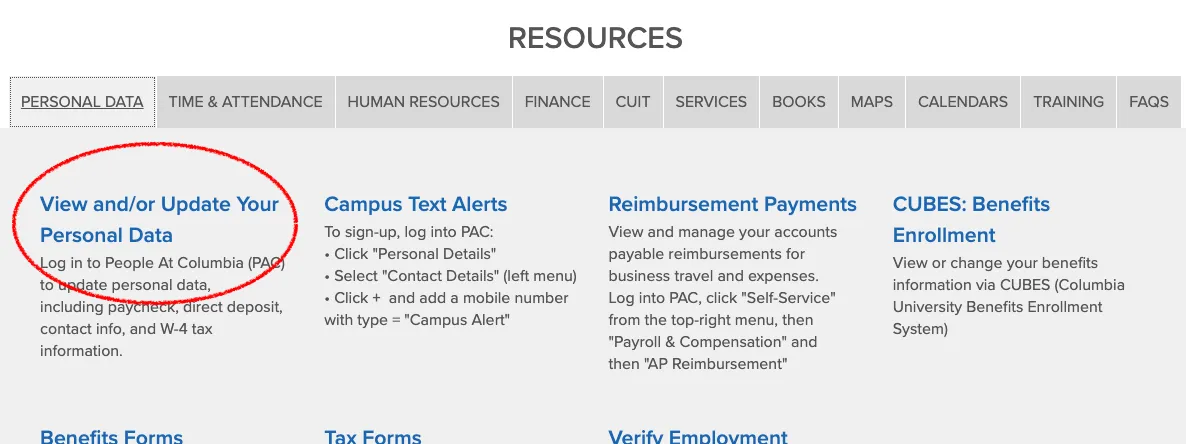
- Choose the Payroll and Compensation button to fill out your bank information and allocate how you would like your paycheck distributed among your accounts.
If you encounter any problems, it may mean that your hire paperwork has not yet been activated. If it has been longer than two (2) weeks since you submitted your new hire paperwork, please contact the Director of HR.