Grades
The grading system of the School of the Arts (SoA) is “P” (pass), “LP” (low pass), and “F” (fail). Honors grades are not given for any SoA course. Receiving a failing grade (“F”) will result in immediate Academic Probation. Depending on previous academic status, it may also result in academic suspension, the loss of financial scholarship, and/or the inability to matriculate or graduate.
It is important to take student attendance and check it against your class roster throughout the semester. However, it is vital to do so during the first two weeks of classes (the add/drop period). If a student is in your class and not on your roster, they will not get a grade from you until they do register. Please remind students to check their own course schedule in SSOL frequently to make sure they get course credit for the work they do.
If there is a student in danger of failing, you must notify the student in writing as soon as possible to provide the opportunity for discussion and/or to rectify the situation.
All Columbia faculty are required to submit their grades electronically through SSOL after the last assignment for the class has been assessed. To maintain academic integrity and privacy, only the faculty on record may enter grades for their course. Because of this, you must have an activated UNI.
To input grades, please follow the steps below:
- Go to: ssol.columbia.edu.
- Log in with your Columbia UNI and password.
- Under “Faculty Services,” select “Web Grading.”
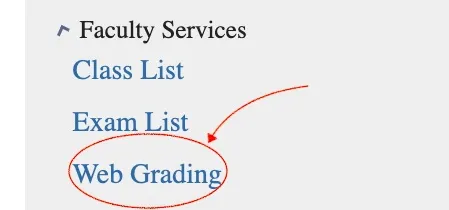
- Once you’ve entered the Web Grading site, you’ll see a list of the classes you’re teaching. From there, the application will guide you through the simple process.
- Choose the appropriate grade for each student from the drop-down menu.
- Click “Submit” when done. Choosing “Save” holds the grades on file and does not formally submit them.
- You will see a screen confirming you want to formally submit the grades to the Registrar's Office. Click "yes."
At the sole discretion of the faculty, if a student has satisfactorily met all the requirements of a course except for certain assigned papers or reports due to reasons beyond their control, they may be given the grade of an Incomplete (“IN”).
It is the student’s responsibility to work with the faculty member to establish a new deadline for the work and communicate that deadline to the Director of Academic Administration.
If the work is not completed within one calendar year, the incomplete grade will automatically be changed into an “F”. Therefore, granting an Incomplete means faculty must make themselves available beyond the end of the course to review the missing work when it is submitted and to change the grade if necessary.
Note that the work of students in the School of the Arts is treated holistically and individual grades are subordinate to the overall evaluation of a student’s development periodically conducted by the program.
"AB" (Absent from the Final Examination)
The AB mark is granted by an instructor no later than the day of the final examination to student whose attendance and progress have been satisfactory but who cannot be present for the final examination because of sickness or another extreme emergency. If the ABS is not removed within one year, it is automatically changed to an F.
"CP" (Credit Pending)
The mark of CP is given only in graduate research courses in which student research projects regularly extend beyond the end of the semester. Upon completion of the project, a final qualitative grade is assigned and credit allowed.
"R" (Registered for Course; No letter grade assigned)
Students registered for R credit are not required to take the final examination, prepare class assignments, or write papers. Under no circumstances will an R be accepted for degree credit in the School of the Arts.
"UW" (Unofficial Withdrawal)
The mark of UW is assigned to students whose names appear on the grade sheet but who have never attended or have discontinued attendance prior to the due date of substantive work. This grade is given to students who did not attend and did not formally drop the class.
"YC" (Year Course)
YC is given at the end of the first semester of a course in which the full year of work must be completed before a qualitative grade is assigned. The grade given at the end of the second semester is the grade for the entire course.
As mentioned above, it is your responsibility to take attendance at every class and to ensure only the students listed on your class roster are in your class.
However, if there is still a discrepancy between your roster and student attendance at the end of the semester, you can write in the student’s name and grade. The Write-In portion of the Grade Roster is kept as an electronic record for the faculty, Program, and Registrar to view in the event that the student becomes properly registered.
NOTE: You must write in the missing student's name before submitting your grades for the semester. SSOL will not allow you to do so once you confirm submission.
The Write-In grade does not automatically feed onto the student transcript, but must be manually entered by the Registrar once the student is registered.
After each action, such as “Save” or “Submit,” a confirmation page will appear to check whether to proceed with the action. Remember, double check that you have submitted your grades, and not just saved them.